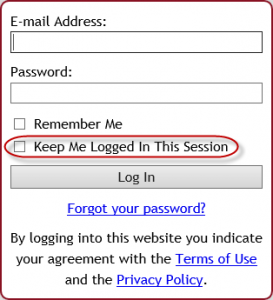
 Starting Monday, August 22, 2016, when you and your clients log into Tabs3 Connect, you will notice a new option on the login screen. The new Keep Me Logged in This Session check box can be selected to prevent you from being logged out due to inactivity. When this check box is selected while logging in, the Automatically log users off after xx minutes of inactivity setting is ignored (System Configuration | Platinum | Tabs3 Connect Administration). All users who have rights to Tabs3 Connect will have access to this login option. You do not have to download new programs to see this new check box. (Note: We recommend that this option not be used on public or mobile devices.)
Archive for category General
New Tabs3 Connect Feature
Aug 18
Aderant, the company who makes CompuLaw Rules, has informed us that they are not planning on updating or supporting CompuLaw Rules that currently integrate with PracticeMaster after December 31, 2016.
As a result of Aderant’s decision, PracticeMaster Version 18 will be the last version of PracticeMaster that will generate or update CompuLaw Calendar Plans. Any CompuLaw Calendar Plans already processed with PracticeMaster will still be accessible.
In order to continue providing up-to-date court rules to our users, we have teamed up with CalendarRules.com, a provider of court rules for law firms. PracticeMaster integration with CalendarRules.com is available with Version 18.1.4, released August 11, 2016.
Last week Dan had the privilege to go to the Innovation Awards breakfast at Legaltech West Coast where Tabs3 was recognized for winning the 2016 Innovation Award for Time and Billing software.

We’re excited to have this prestigious award on display in our office. Thanks to every reseller and consultant that continues to sell and support Tabs3, the most innovative time and billing software of 2016!
An Access Code is now required in order to reindex files using the Delete records that contain errors option. This option should only be used for specific troubleshooting circumstances, which are rare. If you try to run the Reindex Files with the Delete records that contain errors option, you will be asked to provide an Access Code to unlock the delete option. You must contact Technical Support for the Access Code, which will be provided once your particular situation has been reviewed. Using this option may result in a loss of data, that can typically only be fixed by restoring from a good backup.
The Knowledge Base articles have been updated to reflect this new procedure. If you think you need to run the Reindex Files program using the Delete records that contain errors option, we recommend that you check the specific error’s Knowledge Base article for updated troubleshooting steps. This new requirement is present in all Version 17 and 18 programs dated June 10, 2016 or later (i.e., Version 17.1.3.1372 or later, and Version 18.1.3.463 or later).
We’re excited to introduce a new one-sheeter you can use to promote the ProPay integration!
This one-sheeter includes all the awesome benefits of ProPay and will hopefully be a great tool for you to use and get your $100 incentive. This PDF is editable so you can insert your name, phone, and email to make it your own.
As a reminder, the $100 incentive program will continue until July 31st.
Sunsetting Version 15.3
Jun 2
Effective June 1, 2016, we will no longer support Version 15.3 of Tabs3 and PracticeMaster. Knowledge Base Article R11050 provides additional information about the product life cycle of Tabs3 and PracticeMaster.
Please advise clients using older versions that they will need to update in order to receive support. We stopped selling Version 15.3 in March 2011, so it will have been supported for more than five years.
Multiple newsletters have mentioned the sunsetting of Version 15.3, including the May 2016 User Newsletter. Clients using Version 15.3 will be reminded to update each time they speak with a Technical Support Representative. Please contact the Sales Department for pricing information, or to place an order.
A recent change has been made to our software to give firms more time to consolidate timekeepers when they downgrade. Previously the timekeeper reduction happened immediately when the order was processed. Moving forward, the software will continue running the old, higher timekeeper limit for up to 30 days to provide you and your customers a better opportunity to renumber timekeepers. If a firm downloads and installs an update, the downgrade will take effect. Otherwise, if a firm does not install within the 30 days, the software will automatically downgrade.
If a firm wants to install the downgrade, they should go to http://www.tabs3.com/support/update/v18upd.html, download and install.
We are promoting a new white paper written by Caren Schwartz of Time & Cents Consultants through ABA Journal and TechnoLawyer. This white paper explains that law firms generally fall into one of the following categories:
- Shoe Box – law firms that need to review source material such as bank statements to assess their financial situation.
- Excel – Law firms that use Microsoft Excel to track their financial performance.
- QuickBooks – Law firms that use Quick Books for financial management including IOLTA trust accounting.
Caren’s white paper explains the advantages of a fourth option – an integrated legal accounting and billing system.
You can view the white paper here: http://www.tabs3.com/press_articles/Tabs3_Importance_of_Integrated_Software.pdf
If you have an idea for a white paper, let Jenna know at [email protected] and we can collaborate on writing the white paper together.
To view a comprehensive list of our white papers, reference KB Article R11694, White Paper Resource List.
QuickBooks Remote Data Sharing (RDS) software allows Tabs3 users to pass information to the QuickBooks data files without having QuickBooks installed on each workstation. QuickBooks RDS version 2.1 is not compatible with Windows 8 or later and is no longer supported by QuickBooks. QuickBooks RDS version 6 is compatible with all currently supported versions of Windows, but works with Tabs3 version 18 only.
As a result, we have removed QuickBooks RDS from the Tabs3 installation CD and have updated our documentation so that users know which version of QuickBooks RDS they should download and use based on which versions of Windows and Tabs3 they are using.
Knowledge Base Article R10884, “QuickBooks Remote Data Sharing,” has been updated to include the following information:
- A table that shows which version of RDS is required based on the version of Windows being used and the version of Tabs3 installed.
- A link to download QuickBooks RDS version 6.
- Instructions for installing and using each version.
- An updated troubleshooting section.
PracticeMaster now supports the WordPerfect Toolbar Plug-in for WordPerfect X8. The toolbar plug-in allows you to work with documents in WordPerfect and save them as Document Management records in PracticeMaster. You can also create journal, calendar, and fee records while working with a WordPerfect document. Support for WordPerfect X8 requires PracticeMaster Version 18.1.3.439 or later (posted May 12, 2016).