Archive for category General

New & Improved Taskbill Documentation

We are pleased to announce that we have updated our Taskbill documentation. Previously, instructions for each Taskbill format were in separate documents. Now, all instructions have been combined into a single, easy-to-use Knowledge Base article. Although you still have access to the online help provided with Taskbill, this new article includes everything you need to know in one place.

In Knowledge Base Article R11737, “Configuring and Using Taskbill,” you can now select the Taskbill format instructions you want to view from either a list of known organizations, or by the name of the format. Once a format is selected, tailored step-by-step instructions with screenshots are displayed that walk you through how to configure the format in both Taskbill and Tabs3, how to enter time in Tabs3, and how to export statements from Taskbill using the selected format.

Take a quick look at this new article so you are familiar with it when you need it!
Client Notes Added to Tabs3 Statement Designer

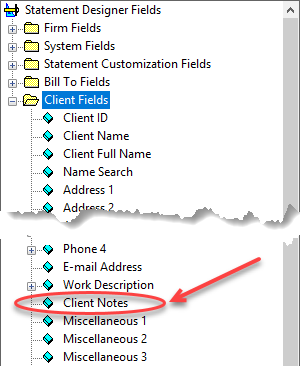
Client Notes now available in Statement DesignerWe recently added the ability to use the Client Notes field in the Tabs3 Statement Designer. Having the ability to include the Client Notes field on the form layout provides greater flexibility when customizing statement and cover statement templates for clients (Version 18.1.4.793 and later).

Electronic Software Delivery

Recently you were informed that we would no longer send out CD’s with new orders. Beginning Tuesday, August 29th, nearly all orders will be delivered electronically. This includes software delivery to firms that are new customers, to firms that are updating from older versions, and to firms that are reserializing software. There are a few exceptions including ODBC Driver sales, some utilities, and Tabs3 Remote orders.


Subscription Pricing is Now Available!

We’re excited to announce that orders can now be placed with subscription pricing!

As a reminder, subscription pricing is available exclusively for Platinum SQL. This allows you to install, train, and customize the most feature-rich level of Tabs3 software to help clients become even more productive.

Tabs3 Billing is $40/month per timekeeper, PracticeMaster is $40/month per user, and Tabs3 Financial software is $10/month per timekeeper.

If you’d like to place an order, please call the sales team at (402) 419-2200 or email them at [email protected].

In order to help you promote subscription pricing to your clients, we put together a few resources that you might find helpful:


Who to Contact When Working with Credit Cards

It can sometimes be difficult to know who to contact when you’re working with the credit card integration in Tabs3 software. Below you’ll find the three sources in which you can receive assistance.

When to Contact Tabs3:

If you need technical assistance when setting up the credit card integration in Tabs3 software, please contact Tabs3 technical support at (402) 419-2210.

When to Contact TSYS:

If you have any sales-related questions pertaining to consultant programs or signing up a firm with a new merchant account, please contact your respective TSYS Sales Representative. Their areas are as follows:

When to Contact ProPay:

You should contact ProPay support at [email protected] when you have any technical questions or issues. They typically only provide support through email, but in your email you can request to have them call out to you if required.

When you have a firm sign up for a credit card merchant account with ProPay, make sure the email address for credit card issues is a contact at the firm and not your own. This will help prevent miscommunication between ProPay and the firm.

Sunset of Version 16

Effective June 1, 2018, we will no longer support version 16 of the Tabs3 and PracticeMaster software. Knowledge Base article R11050 provides additional information about the product life cycle of Tabs3 and PracticeMaster software.

Please advise clients using these older versions that they will need to update in order to receive support after June 1 of next year.

The June 2017 User Newsletter has an announcement on the sunsetting of version 16. Clients using version 16 will be reminded each time they speak with a Technical Support Representative. Please contact our Sales Department for pricing information or to place an order.

Webroot Antivirus Issue

For a very short period of time on 4-24-2017, Webroot Version 9.0.15.50 started quarantining various files due to false positives. Webroot reports they have fixed the problem. It appears you must remove the files from quarantine before you can successfully use the Tabs3 software.

PracticeMaster Feature Comparisons

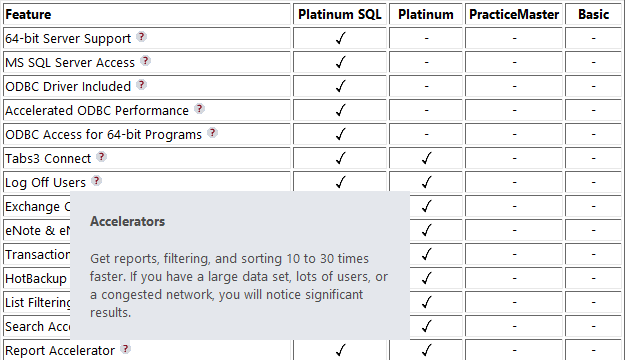
Do you ever need to tell someone what’s included in the free version of PracticeMaster? Or tell current users the difference between the free version and the paid version of PracticeMaster? Or even discuss what’s extra in the Platinum or Platinum SQL version of PracticeMaster?

We’ve got the answer!  You may already be familiar with Knowledge Base article R11548, PracticeMaster Feature Comparison. We recently updated this article to include tooltip information regarding the various features in the different levels of PracticeMaster. Consider adding this page to your Favorites. 

Thank you Joe for the great idea!

2017-04-10pmpopup

Importing Fees & Costs via Excel

We recently received several requests from firms for information on how to import fees and costs into Tabs3 or PracticeMaster via an Excel spreadsheet. As a result, we’ve posted a new Knowledge Base article that provides detailed information on how to do this. Knowledge Base article R11724, Importing Fees and Costs Into PracticeMaster from Microsoft Excel, includes a great overview, a simple Excel spreadsheet format, and step-by-step instructions for using the PracticeMaster Import Data Wizard to import an Excel spreadsheet.

2017-04-excelexample

Although many of you are already familiar with the Import Data program, this article focuses solely on importing fees and costs into PracticeMaster, which are then automatically synchronized to Tabs3. Take a look at this article for yet another method of importing fees and costs into Tabs3 and PracticeMaster.

New CDs Used for Supplemental Programs

We are now using different CDs to ship special products such as ODBC, SplitT3, CopyT3, and Bitmaps, as well as repaired or converted data. These CDs are white with black lettering, and marked “Supplemental Products”. We no longer create unique CDs for special products or data. The CDs will, however, have a label affixed inside the case describing the CD contents. The CDs for our standard products have not changed.