We recently posted a change in PracticeMaster to fix a “One or more errors occurred while searching for the e-mail in Outlook” message that occurred with Outlook 2013. This message occurred for some users when trying to save an e-mail from Outlook 2013 to PracticeMaster (both when sending and when journaling from the Inbox). Not all firms using Outlook 2013 experienced this problem; however, if your PracticeMaster clients use Outlook 2013, make sure they install updated programs in order to avoid any inconvenience (Version 16.2.4.479).
“Taking Care of Business” was our theme for this year’s Forum. However, it’s not just a theme for us. Taking care of business is something we do every day to make sure we provide you with quality products and tools to support your clients, so you can take care of your own business.
Those of you attending got to see a sneak peak of great new things to come in Version 17. Your input at this event always plays an important role in our product development. Keep those ideas coming!
Once again we had an amazing collection of resellers at this year’s Forum, with many seasoned veterans sharing their vast wealth of knowledge. Many thanks to the speakers below that volunteered their time and talent to help make our Forum so successful. We couldn’t do it without you!
2013 Forum Speakers
Mary Jo Boyd – Attorney Computer Systems
Debbie Foster – Affinity Consulting Group
Steven Best – Affinity Consulting Group
Sandy Adams – Affinity Consulting Group
Monica D’Amore – D’Amore Consulting LLC
Norman Calderon – Greentree Solutions LLC
Cathy Prichard – NorthWest Law Office Automation
Kate Jasaitis – The KCJ Consulting Co LLC
Paul Purdue – Attorney Computer Systems
Dominic Morinelli – Computer Network Services
Michelle Motyka – Affinity Consulting Group
Stacy Devlin – Affinity Consulting Group
Bill Baker – Baker+Cadence|Solutions
Rick Bernauer – CyTek Corporation

Norman Calderon repeats as Tabs3 Reseller of the Year.

Sandy Adams and Britt Lorish accept Reseller of the Year award for Affinity Consulting. They were also recipient of the Platinum Reseller of the Year.
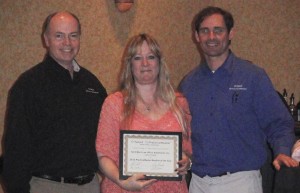
Cathy Prichard returns to the awards circle and accepts her PracticeMaster award.

Your fearless sales guys from left to right, Craig Paulsen, Scott Baird, Joe Abler, Dan Berlin and Doug Kocian.
Trial Software Changes
May 9
You recently received an e-mail from us regarding our new downloadable Trial (see below for original e-mail). The new form automatically sends an e-mail to the address entered with the lead. To prevent these firms from receiving this automatic e-mail, simply use the link below we’ve created specifically for leads of this nature.
_____________________________
Good morning everyone,
In our effort to send you more leads, we have re-designed our trial software request form. There are two major changes.
First, we ask for much less information. Our research indicates that a shorter form will result in more leads to pass along to you.
Second, we now offer a downloadable trial from our main request form. The previous trial download page is no longer available. When you visit the new request form, you will notice a choice between a downloadable trial and a CD in the mail. If a download is selected, we automatically e-mail a link to our new download page, along with links to the same helpful resources that we offer with a physical CD.
Please visit our home page and click the “Free Trial Software” button to see our new form. Take a few minutes to fill it out, keeping in mind that some fields do not appear until a preceding field is completed.
Please let us know if you have any questions.
Updated Platinum Flyer
May 8
A new one-page condensed Platinum flyer is now available as a PDF right here in eNews. You can find it under Marketing, then Flyers & Whitepapers. The file is called “Tabs3 and PracticeMaster Platinum Flyer.”
If this flyer looks familiar to you to you, that’s because it’s very similar to the Platinum page in our premium brochure. This means if you leave the premium brochure with a prospective client, you won’t need to also leave a Platinum flyer.
We hope our marketing materials are valuable to you and to your prospective clients. If you have any ideas about additional marketing materials that would come in handy, let us know!
For a limited time, Tabs3 and PracticeMaster logo shirts are available for order. They are perfect attire for trade shows or meetings with potential customers. Each shirt is custom ordered and embroidered with our logo. To purchase, fax or e-mail your order by May 31, 2013.
Order Form: http://www.tabs3.com/offers/shirts2013.pdf
We recently posted updated programs that include the following enhancements (Version 16.2.4.470):
- The limit of 149 WorkFlows per file in PracticeMaster now only applies to active User Activated WorkFlows.
- The Tabs3 Connect Fee editor will automatically recalculate the Amount whenever the Hours or Rate is changed (provided the previous Rate x Hours equaled the Amount).
- The Save Format option on the Worldox Save As dialog will now include additional options, not just .doc, when running Microsoft Word 2007 or later. After installing this update, you will need to do the following:
- While Worldox is running, open the Worldox Integration window in PracticeMaster and click OK (Maintenance | Integration | Worldox Integration).
- Close PracticeMaster.
- Restart Worldox.
- Repeats steps 2 and 3 for each workstation.
Discontinued Features
Mar 22
In conjunction with the upcoming Version 17 release of our software, scheduled for later this year, we will be discontinuing the following features:
- QuickBooks Integration with PracticeMaster Only – QuickBooks integration will only be available when Tabs3 is installed.
- QuickBooks IIF integration – This type of integration is no longer supported by QuickBooks. We will continue to support the QBXML integration with Tabs3 that QuickBooks recommends and supports.
- PracticeMaster Briefcase – Tabs3 Connect is an excellent alternative to PracticeMaster Briefcase.
- DOS Cost Recovery Software – Our Tabs3 Device Interface program (TBDevice.exe) replaces these utility programs. These legacy programs do not run on 64-bit operating systems and have become obsolete. Although any cost recovery programs that firms currently use will continue to work with the Version 17 software, effective immediately, we will no longer sell these programs, or provide updates or recopies of these programs. We encourage you to contact us at your convenience regarding transitioning firms to the recommended replacement program, Tabs3 Device Interface. Be advised that firms that require a new serial number due to an update or upgrade will need to upgrade to the Tabs3 Device Interface program at that time.
- WCNVASCV.EXE – Our Tabs3 Device Interface program (TBDevice.exe) replaces WCNVASCV.EXE. The Tabs3 Device Interface program includes the format used by WCNVASCV. Effective immediately, we will no longer sell WCNVASCV.EXE. Firms that have this program on maintenance are eligible to receive a free upgrade to the Tabs3 Device Interface program upon request.
Although our research indicates that a small percentage of firms use these features, we have made this announcement so that you can begin to work with your clients to plan for any transition.
Sunset of Version 14
Mar 5
Effective January 1, 2014, we will no longer support Version 14 and earlier versions of Tabs3 and PracticeMaster software. Please advise clients using these older versions that they need to update in order to receive support. We stopped selling Version 14 in October 2008, so it will have been supported for more than five years.
Version 14 users have already been notified via e-mail, and are being reminded each time they speak with a Technical Support Representative. The January 2013 User Newsletter had an announcement on the sunsetting of Version 14. We will continue to have reminders throughout the remainder of the year. Please contact Client Services for pricing information, or to place an order.
Version 16 Update Plan
Feb 22
Soon we’ll begin a campaign to encourage firms on maintenance to install their Version 16 update. Members of Client Services will make these calls, beginning with our largest customers. We’ll be sure to refer firms running older versions back to their reseller if they need assistance.
There are a few reasons why we want firms on the current version of the software:
- The new features provide a better experience for customers.
- The further a firm falls behind, the more involved the conversion becomes for them.
- When firms get behind, we risk losing them to a competitive product.
- It’s easier to support customers on the current version.
Congratulations to Donna Brown of Beyond Square One of Blanchard, Oklahoma who reached Certified Reseller status for Tabs3 and PracticeMaster! Beyond Square One will be added to our Certified Reseller list and map.
http://www.tabs3.com/resellers/cr_southcentral.html
Please contact your Sales Representative if you have questions about becoming a Certified Reseller.