New Hologram Checks from Nelco

Nelco is now offering hologram security with their checks. They are our preferred check vendor for use with Tabs3 Trust Accounting and Tabs3 Accounts Payable. From the Tabs3 page on Nelco’s site, simply hover over “Hologram Security is now Available” with your mouse, and complete the form to receive additional information.

If you talk to a client who is interested in Nelco checks or forms, fill out the contact form and a Nelco representative will be in touch with them.

For more information about ordering checks from Nelco, visit KB Article R10978.
PracticeMaster Webinar Promotion

We will host a free PracticeMaster webinar on October 25th at 2pm Central Time. It will be promoted to leads, as well as Tabs3 users who have not purchased PracticeMaster. It will also be promoted to TechnoLawyer and American Lawyer Media subscribers.

As always, we’ll send you any of your leads or customers that sign up, as well as new prospects.

Those that sign up will have their name entered into a drawing for a free Fujitsu ScanSnap iX100 Wireless Mobile Scanner.

You can have your firms and prospects register at: http://forms.tabs3.com/pmdemo/

In-house Conversions

We’ve performed numerous in-house billing and practice management conversions over the years. An online form was recently created to improve the speed of the conversion process. If you have prospects interested in converting to the current version of Tabs3 and PracticeMaster, let us know by simply completing the conversion estimate request using the link below.

http://forms.tabs3.com/conversion-lead-form/

Answers to these questions provide us with the basic level of information we need to give an estimate on what the conversion will cost.

Save the Date for the Forum!

Mark your calendar – dates for the 2017 Forum are set! The Forum will be held Friday April 21, to Saturday April 22 at the Embassy Suites in downtown Lincoln. Take this opportunity to learn more about Tabs3 Software, share ideas with fellow resellers, and meet a large part of the Tabs3 staff. It will be a blast!

Do you have an idea for a session you would like to attend, want to present one of your favorite topics? Submit your suggestions to Myrna Johns at [email protected]!

Did you miss out on FREE training?

We’re currently offering free training sessions to help your office get up to speed on Tabs3 Software. If you would like to attend this training, or view the recorded sessions (available until Thanksgiving), send an email to [email protected] and we’ll provide the links that you need. The training sessions are as follows:

  • Installing and Configuring Tabs3 Software
  • Resource Discourse – An Overview of Knowledge Base
  • What does it do? An overview of the Tabs3 suite of products
  • Tabs3 Billing Procedures Overview
  • The Power of PracticeMaster
  • Integrating with Outlook and other 3rd party software
  • Financial Software Integration Overview
  • Customizing PracticeMaster

View All Calendar Fields in Tabs3 Connect

Our most recent posting of PracticeMaster includes the ability to View All fields in the Calendar File in Tabs3 Connect. This means that you can now view any custom fields implemented in the Calendar File while using Tabs3 Connect. Previously, only the default fields in the Calendar File were accessible via Tabs3 Connect. You will need to download new programs in order to use this feature (18.1.4.534 and later).

New Features Added to CalendarRules Integration

On September 2, 2016, we posted several new features to the CalendarRules integration we released last month.

  • Configure Which CalendarRules Items Will Be All-Day Events
    We added the ability to configure which CalendarRules record types will be created as All-Day Events in PracticeMaster.  By default, any item with a Start Time is created as an event.  You can now designate whether you want Trigger items,  Appear or Attend items, File and/or Save items, and Other items that do not have a Start Time specified to be created in PracticeMaster as All-Day Events. Otherwise, they will be created as tasks.
  • Matter Manager Has New Calendar Plan Filter
    The Matter Manager now includes a new Calendar Plans filter. When using this filter, the list displays the trigger item for each generated Calendar Plan. Clicking the trigger item opens a View Calendar Plans window that shows all items in the Calendar Plan. This feature is available for CalendarRules Calendar Plans as well as Calendar Plans generated by PracticeMaster Calendar Plan Templates.
  • Matter Manager Has New Calendar Plan Icons
    When viewing All Activity in the Matter Manager, we added new icons to distinguish whether the event is a regular event, a Calendar Plan event or a CalendarRules event, and whether the task is a regular task, a Calendar Plan task or a CalendarRules task.

These new features are available with 18.1.4.534 and later. You can learn more about CalendarRules integration in the following resources:

  • Knowledge Base Article R11713 – CalendarRules Integration Overview
  • Recorded Webinar – CalendarRules Integration with PracticeMaster – http://forms.tabs3.com/cr

New Tabs3 Connect Feature

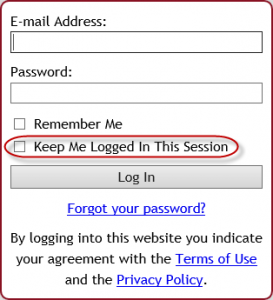
t3c_keepmeloggedinStarting Monday, August 22, 2016, when you and your clients log into Tabs3 Connect, you will notice a new option on the login screen. The new Keep Me Logged in This Session check box can be selected to prevent you from being logged out due to inactivity. When this check box is selected while logging in, the Automatically log users off after xx minutes of inactivity setting is ignored (System Configuration | Platinum | Tabs3 Connect Administration). All users who have rights to Tabs3 Connect will have access to this login option. You do not have to download new programs to see this new check box. (Note: We recommend that this option not be used on public or mobile devices.)

Learn More about CalendarRules, Our Newest Integration Partner

We’re excited to announce our new integration partner, CalendarRules!

CalendarRules.com offers general civil litigation-related court and agency Rule Sets for State, Federal, Appellate and Bankruptcy courts across the United States. Currently, rules are available in all 50 states, with additional courts being added every month.

CalendarRules makes updated rules available to the end user in real time. Courts generally announce updates in two ways:

  1. Many updates are published for comment, with a scheduled effective date. CalendarRules makes these updates in their staging environment and releases them to production on the effective date. Thereafter, any subscriber to that court is automatically using the new rules.
  2. Sometimes a court will publish rule changes with an immediate effective date. CalendarRules is positioned to make these changes effective immediately.

CalendarRules does offer revenue sharing options. Your primary contact at CalendarRules is Stacy Saliman ([email protected]). To get started, please send Stacy an email with your contact details and a request for a draft reseller agreement, along with any additional questions you may have.

Join Scott Davis, the founder of CalendarRules, and Bruce Policky, the Product Manager for Tabs3 Software, on August 26th at 1pm Central Time to learn more about the CalendarRules integration with PracticeMaster.

If you have clients who are interested in the webinar, please direct them to this link –> http://forms.tabs3.com/cr

CompuLaw Rules Integration Ending

Aderant, the company who makes CompuLaw Rules, has informed us that they are not planning on updating or supporting CompuLaw Rules that currently integrate with PracticeMaster after December 31, 2016.

As a result of Aderant’s decision, PracticeMaster Version 18 will be the last version of PracticeMaster that will generate or update CompuLaw Calendar Plans. Any CompuLaw Calendar Plans already processed with PracticeMaster will still be accessible.

In order to continue providing up-to-date court rules to our users, we have teamed up with CalendarRules.com, a provider of court rules for law firms. PracticeMaster integration with CalendarRules.com is available with Version 18.1.4, released August 11, 2016.