Update for Version 2020 Platinum Customers

On April 30th, we posted an update to the Platinum software for Version 2020. This update includes the following changes:

Update while Users are in the Software – We made changes that now allow you to install updates to the Platinum software as long as all users have run the setup program on their local workstation. This will make it easier to update during the day instead of having to wait until after hours. After the update is finished, users can close their program and relaunch it when it is convenient for them in order to receive the update. The only time everyone will need to exit the software in order to install an update is when an STI Server component needs to be updated, which is not very often. You will have to install this update from the server as it does include a director update. 

Accelerator Configuration – This update also includes a change to how we handle the network address and port numbers for the accelerators on new installs. You no longer need to configure port numbers for the accelerators. The port numbers will be assigned by the operating system. Port number configuration for the Accelerators has been moved to an Advanced Accelerator Configuration window which shouldn’t need to be used often.

Existing firms will continue to use their previously assigned port numbers. If you encounter a firm experiencing issues due to port conflicts with other software, you can clear the settings in the Advanced Accelerator Configuration window and let the Operating System take care of the assignments.

Accelerator Status – You can now check the accelerator status in Help | About for both Tabs3 and PracticeMaster.  Tabs3 it will show the T3Accel Current Status as Connected if they are working.  It will show as Local if they are not.  For PracticeMaster it is the PMAccel Current Status. 
Updated Tabs3 Billing Client Manager Video

We’re excited about the new facelift being given to the Tabs3 Billing Client Manager, now called Matter Manager.  This feature has a great new look and provides much added functionality and usability.  It allows users to view relevant information for each matter at a glance, perform common tasks and run reports, all from one location.

If you weren’t able to attend the recent demonstration that included the new Matter Manager, be sure to take a few minutes and view the video:

Using the Matter Manager  (3:32)

Click here for additional information and screenshots.

The new Matter Manager is presently available in Pre-Release.  Additional features will be added to Pre-Release throughout the summer and we’ll continue to update you when they become available.

See the New Features Available in Pre-Release article recently posted for details on signing up for Pre-Release.

New Features Available in Pre-Release

There are several new features available for Pre-Release in Tabs3 Version 2020. Below are a few of the items found in Pre-Release:

  • PracticeMaster – Calendar Time Zones
  • Tabs3 Billing – Updated Client Manager (renamed to the Matter Manager)
  • Increased field length for several fields

Visit R11842 for the latest details on new features and the Pre-Release program. 

These new features are available for customers and consultants, so make sure you get signed up.  Customers on maintenance and consultants with existing NFR licenses are eligible.  To gain access to these new features simply send an email to [email protected] with name, firm, phone and serial number.  The Pre-Release team will follow up with a Pre-Release agreement.

New Feature! – Tabs3 Connect Users added to the User List

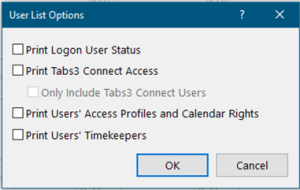
A new Version 2020 feature was recently added to the existing User List found in System Configuration (Reports | User List).  After downloading the most recent update firms will see two new options available when running this report, “Print Tabs3 Connect Access” and “Only Include Tabs3 Connect Users”. 

The Print Tabs3 Connect Access check box will include a new column on the report indicating whether the user has Tabs3 Connect Access or not (Yes or No). If the user has Billing Only Tabs3 Connect access, it will indicate “Billing Only” instead of Yes or No.  

We also added an option (Only Include Tabs3 Connect Users) to filter the report for only users that are configured for Tabs3 Connect to make it even easier to see which users are configured.

Firms with maintenance on 20.1 are eligible for this new feature and can simply Check for Updates to obtain it.  This change is NOT available in the Pre-Release version (20.2) but will be in the near future.   Help|About will indicate if a firm is on Pre-Release. 

Collaboration Database Reminder

I would like to remind everyone about our collaboration database that many of you have contributed to.  This database contains numerous consultants who offer a wide variety of specializations including Tabs3 and PracticeMaster, accounting, 3rd party integrations, Outlook, SQL assistance, knowledge about competition, and much more. If you’re not already familiar with your peers in our consultant channel and would like expert knowledge in a specific area, we’re happy to connect you.

Tabs3 Transporter Testing

Recently you were notified that we were updating the Tabs3 Transporter.  This update will allow customers to convert from Timeslips Version 2017 and newer.  Previously this utility program was limited to converting only versions 2016 and prior.

Testing is in its final stages and we are ready to put it to work.  The Transporter is very much looking forward to rescuing Timeslips data!  We would love to hear from you.  If you have a Timeslips customer running version 2017 or newer that is interested in converting to Tabs3, let us know.  For a limited time, we’ll do the conversion in-house, and do it for free!  If you have questions or are interested in a conversion, contact [email protected].  We are still running the 15% off discount (limit $150) for Timeslips users.

Forum Changes and Working From Home Information

Like many of you, we are making changes to cope with present-day adversity and all of the challenges that come with it.  Nearly all of our employees are working from home, including Sales and Technical Support staffs.  This has presented its share of challenges, but we are up for the task and doing our best to maintain the quality of service you’ve come to know.  We appreciate everyone’s patience and understanding during these unprecedented times.

As you know, we’ve rescheduled the Forum for Thursday and Friday, September 10th & 11th with a CosmoLex deep dive scheduled early to mid-afternoon on Wednesday September 9th.  A President’s Circle member meeting will also take place on Wednesday late in the afternoon.

Consultants and customers were notified of a new resource available called Working From Home.  It covers options such as Tabs3 Connect, remote access software, hosted solutions, etc.  This document also includes videos for Remote Access Overview and Working with Tabs3 Connect.  This is great to share with customers and prospects alike.  A link to it can also be found from a new banner located on top of the Tabs3 Homepage.

New Feature!

Due to an influx of interest from customers wanting the ability to export client lists containing  email addresses from Tabs3, we’re now including the email field automatically when users select the “Export As” radial button from within Client Labels.  Many firms wanted to communicate information about COVID-19 using bulk emailing.  This feature can be found in version 20.1.8.917 and later.  For additional information, visit Knowledge Base Article R11845, “Exporting Email Addresses from Tabs3 Software.”

Newly Added Videos

New videos have been added to our Tabs3 and PracticeMaster video library:

Using Tabs3 Connect (2:05)

Working with Remote Options (2:08)

Getting Started with Document Management (5:07)

Adding a Vendor (2:48)

Email [email protected] if you have an idea for a video or wish to provide feedback.

More New Training Videos!

Our video crew continues to crank out great new training video content for clients and prospects.  Below are the most recently added to an already impressive library.

Using the Matter Manager (PracticeMaster, 3:34)

Conflict of Interest Search (PracticeMaster, 4:16)

Calendar Overview (PracticeMaster, 5:03)

Using Recurring Dates (PracticeMaster, 2:26)

Invoice Attachments (Accounts Payable, 1:21)

Check out Tabs3 and PracticeMaster Training Videos to see all video content.  Do you have an idea for a video or wish to provide feedback?  Simply send an email to [email protected].  We would love to hear from you!