Archive for category PR / Announcements

More New Videos!

Our video crew remains hard at it compiling training videos of popular Tabs3 and PracticeMaster features.  These are great to share with clients and prospects.

Don’t be shy!  If you have suggestions for a new video, send an email to [email protected].  Check out Tabs3 and PracticeMaster Training Videos to see all video content.
New Game Changing Features now Available in Version 2020!

Our team has been working hard on new Version 2020 features and we are excited to let you know that these are now available. Several of these features are game changers and you should evaluate how you demo and train on the software. 

  • Tabs3 Matter Manager – The Tabs3 Client Manager has been changed to the Matter Manager with a new look and improved features. Check out this Tabs3 Matter Manager Video.
  • Time Zone Field – A Time Zone field has been added to the PracticeMaster Calendar allowing you to specify a time zone for events and tasks. Knowledge Base article R11836, “PracticeMaster Time Zone Overview”, includes additional information regarding this feature. Check out this Enabling Time Zones Video.
  • Expanded Fields – Several field lengths have been increased in the software such as the Work Description in the Tabs3 Client file, the Amount field in the Payment file, and the Statement Number field when generating statements. See KB article R11812 for a complete list of the fields that were expanded.
  • Statement Enhancements
    • Cover Statement Continuation Layout in Statement Templates
    • Custom Fields in Statement Designer Layouts
    • Group PDF Output by Sort
    • Optional Cover Statement when generating Statements

These features are available to all firms on a Maintenance Plan. Simply go to Help | Check for Updates to download and install the new features. Stay tuned for still more items we’re working on!

New Feature – Exporting Statements for State Farm Cluster Billing

A new feature is now available in Tabs3 Taskbill allowing firms to export statements for State Farm Cluster Billing.  Please review R11583 in the Knowledge Base for complete details.  Firms on maintenance wishing to obtain this new feature should go to Help | Check for Updates.  Contact a Technical Support Representative if you have questions.

New Installation Wizard

We recently released a new installation wizard to assist users installing Tabs3 Software.  The installation wizard makes it easier to setup new systems eliminating the need to customize each product.  When new products are added the wizard will only ask relevant questions specific to the product being added.  Expect to see the helpful new wizard on your next new install!

New Features Available in Pre-Release

There are several new features available for Pre-Release in Tabs3 Version 2020. Below are a few of the items found in Pre-Release:

  • PracticeMaster – Calendar Time Zones
  • Tabs3 Billing – Updated Client Manager (renamed to the Matter Manager)
  • Increased field length for several fields

Visit R11842 for the latest details on new features and the Pre-Release program. 

These new features are available for customers and consultants, so make sure you get signed up.  Customers on maintenance and consultants with existing NFR licenses are eligible.  To gain access to these new features simply send an email to [email protected] with name, firm, phone and serial number.  The Pre-Release team will follow up with a Pre-Release agreement.

New Feature! – Tabs3 Connect Users added to the User List

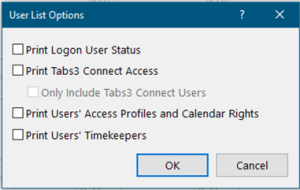
A new Version 2020 feature was recently added to the existing User List found in System Configuration (Reports | User List).  After downloading the most recent update firms will see two new options available when running this report, “Print Tabs3 Connect Access” and “Only Include Tabs3 Connect Users”. 

The Print Tabs3 Connect Access check box will include a new column on the report indicating whether the user has Tabs3 Connect Access or not (Yes or No). If the user has Billing Only Tabs3 Connect access, it will indicate “Billing Only” instead of Yes or No.  

We also added an option (Only Include Tabs3 Connect Users) to filter the report for only users that are configured for Tabs3 Connect to make it even easier to see which users are configured.

Firms with maintenance on 20.1 are eligible for this new feature and can simply Check for Updates to obtain it.  This change is NOT available in the Pre-Release version (20.2) but will be in the near future.   Help|About will indicate if a firm is on Pre-Release. 

New Feature!

Due to an influx of interest from customers wanting the ability to export client lists containing  email addresses from Tabs3, we’re now including the email field automatically when users select the “Export As” radial button from within Client Labels.  Many firms wanted to communicate information about COVID-19 using bulk emailing.  This feature can be found in version 20.1.8.917 and later.  For additional information, visit Knowledge Base Article R11845, “Exporting Email Addresses from Tabs3 Software.”

Rolling out new Features

We are in the process of rolling out new features for Tabs3 Version 2020.  The following features are now available in Pre-Release:

  • PracticeMaster Calendar Time Zones
  • CMARC file limit increase

Other features coming soon to Pre-Release:

  • Field length extensions for Clients, Contacts, and Payments
  • Increase statement number limit to 999,999,999

Customers on a Maintenance Plan that are interested in these new features are eligible to join the Pre-Release program.  They can simply send an email to [email protected] to start the process.  The Pre-Release team will send a Pre-Release Agreement, and once signed and returned, the customer will be able to download and install the latest version.

New Features Posted

Version 20.1.8 of Accounts Payable now has the ability to store a copy of an invoice or receipt with the corresponding invoice, manual check, or EFT.  Simply click the new Attach File button and select the file you want to store with the invoice.  When the APS entry is saved, a copy of the attached file will be placed in an “APS Invoice” folder in the Current Working Directory.

Additionally, we added the ability to quickly print an individual check for an unpaid invoice from the APS dashboard.

Keep up-to-date with all the changes to Version 2020 by reviewing the Version 2020 Release Notes, watching for update emails, and reading eNews.  Firms can also use the Help|Check for Updates option to get the latest release information.

Renovations Complete!