A new Version 2020 feature was recently added to the existing User List found in System Configuration (Reports | User List). After downloading the most recent update firms will see two new options available when running this report, “Print Tabs3 Connect Access” and “Only Include Tabs3 Connect Users”.
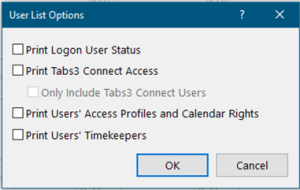
The Print Tabs3 Connect Access check box will include a new column on the report indicating whether the user has Tabs3 Connect Access or not (Yes or No). If the user has Billing Only Tabs3 Connect access, it will indicate “Billing Only” instead of Yes or No.
We also added an option (Only Include Tabs3 Connect Users) to filter the report for only users that are configured for Tabs3 Connect to make it even easier to see which users are configured.
Firms with maintenance on 20.1 are eligible for this new feature and can simply Check for Updates to obtain it. This change is NOT available in the Pre-Release version (20.2) but will be in the near future. Help|About will indicate if a firm is on Pre-Release.