Archive for March, 2019

Recap, Alarms, and ScanSnap, Oh My!

Make sure your clients are updating their software regularly. The following enhancements were made and posted with Version 19.1.8.931:

 Tabs3 and PracticeMaster

  • The Recap of Hours has been updated as follows:
    • Navigation arrows have been moved and will always be visible.
    • When selecting Week:
      • A calendar week (Sun through Sat) will always be shown.
      • On each day, the hours value is now always shown in the graph.
      • For each day the month/day is now also shown above the day of the week.
    • When entering fees in Tabs3, the Recap of Hours button will open the recap of hours for the current timekeeper instead of the default timekeeper to match how it worked in Version 18.

PracticeMaster

  • The Alarm Notification window has been updated as follows:
    • The Location field is now shown so that you can easily see where you need to go without opening the record.
    • For events, the End Time is now included so that you can see at a glance how long the event is set to last.
    • You can now eNotify the record to attendees, or anyone, using the eNotify button on the toolbar or the right-click menu.
    • The right-click menu now has an option to Delete the linked calendar record.
    • The Type field has been removed.
  • Fujitsu updated their software for newer ScanSnap models to ScanSnap Home. The ScanSnap Plug-in can now integrate with either the ScanSnap Manager or the ScanSnap Home software.

To take a look at these new features, check out KB Article R11744, “Introduction to Version 19 Features.”
New Security Feature for Platinum Firms in Version 19

You’re probably aware that the data files were moved to a “Database” folder during the Version 19 conversion. Are your Platinum firms taking advantage of this change?

This file structure reorganization made it possible for us to implement our new Platinum Data Security feature. This feature allows firms to implement restricted network permissions so that only authorized users (typically Admin and IT users) have access to the Tabs3 Database folder. Users without full rights to the Database folder can only modify those files using Tabs3 software. This prevents unauthorized users from accessing the files on the network, but still allows them to work in the software. Restricting network access rights helps protect key Tabs3 data files from accidental or malicious attempts to compromise your important Tabs3 information.

Implementation of this feature is accomplished by changing write permissions to the Database folder on the server, not from within the Tabs3 software. More information can be found in Knowledge Base Article R11763, “Platinum Data Security.” This feature is available in all releases of Version 19 Platinum software.

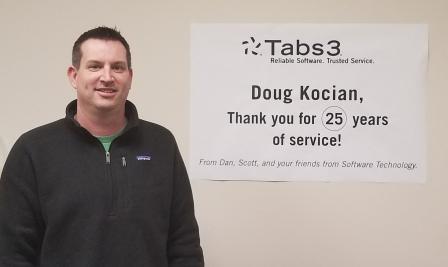
Doug Kocian Celebrates 25 years with STI

Sales Supervisor Doug Kocian Celebrating 25 years with STI.

Congratulations Doug!

Marketing Coordinator Roles Update

We’ve made recent internal changes to our marketing structure. Chris Ames will focus on marketing to find new clients, and DeAnna Masterson will focus on marketing to existing clients, e.g. upgrades, add on products, etc.  Please make note of this for future reference.

DeAnna Masterson – Marketing Coordinator for Existing Clients:

  • Consultant contact
  • The Forum
  • Training

Chris Ames – Marketing Coordinator for New Clients:

  • Walkthroughs
  • Webinars
  • Tabs3 website
  • Industry contact, e.g. bar associations, publishers, etc.