For a very short period of time on 4-24-2017, Webroot Version 9.0.15.50 started quarantining various files due to false positives. Webroot reports they have fixed the problem. It appears you must remove the files from quarantine before you can successfully use the Tabs3 software.
Archive for April, 2017
Webroot Antivirus Issue
Apr 24
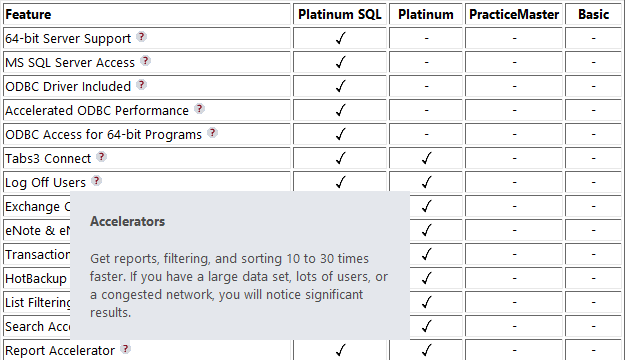
Do you ever need to tell someone what’s included in the free version of PracticeMaster? Or tell current users the difference between the free version and the paid version of PracticeMaster? Or even discuss what’s extra in the Platinum or Platinum SQL version of PracticeMaster?
We’ve got the answer! You may already be familiar with Knowledge Base article R11548, PracticeMaster Feature Comparison. We recently updated this article to include tooltip information regarding the various features in the different levels of PracticeMaster. Consider adding this page to your Favorites.
Thank you Joe for the great idea!
We recently received several requests from firms for information on how to import fees and costs into Tabs3 or PracticeMaster via an Excel spreadsheet. As a result, we’ve posted a new Knowledge Base article that provides detailed information on how to do this. Knowledge Base article R11724, Importing Fees and Costs Into PracticeMaster from Microsoft Excel, includes a great overview, a simple Excel spreadsheet format, and step-by-step instructions for using the PracticeMaster Import Data Wizard to import an Excel spreadsheet.

Although many of you are already familiar with the Import Data program, this article focuses solely on importing fees and costs into PracticeMaster, which are then automatically synchronized to Tabs3. Take a look at this article for yet another method of importing fees and costs into Tabs3 and PracticeMaster.